
Top CAD Software for Stunning Interior Design: CAD Tools for Interiors

When it comes to creating jaw-dropping interiors, the right tools make all the difference. You want software that’s powerful, intuitive, and tailored to your craft. Whether you’re designing custom cabinetry, millwork, or full-scale interior layouts, CAD tools for interiors can transform your ideas into reality. But with so many options out there, how do you pick the best one? Let’s dive into the top CAD software that will elevate your interior design game and streamline your workflow.
Why You Need the Right CAD Tools for Interiors
Imagine sketching a design on paper, then trying to explain it to your client or workshop team. It’s tricky, right? That’s where CAD software steps in. It lets you create precise, detailed 3D models that everyone can understand. You can visualize spaces, test materials, and tweak designs before cutting a single piece of wood.
The best CAD tools for interiors offer:
Accuracy: Precise measurements and scale.
Visualization: Realistic 3D renderings.
Customization: Tailored libraries for cabinetry, millwork, and more.
Efficiency: Streamlined workflows from design to production.
With these features, you save time, reduce errors, and impress clients with professional presentations. Plus, you get to experiment freely without wasting materials.

Top CAD Software for Interior Design Pros
Let’s get to the good stuff. Here are some of the best CAD programs that woodworking, cabinetry, and interior design professionals swear by:
1. PYTHA 3D CAD
PYTHA is a powerhouse for woodworking and interior design. It’s an all-in-one 3D CAD software that combines design, visualization, and production planning. What sets PYTHA apart is its focus on the woodworking industry, making it perfect for cabinetry and millwork.
User-friendly interface: Easy to learn, even if you’re new to CAD.
Parametric design: Quickly adjust dimensions and components.
Integrated production tools: Export cutting lists and CNC data.
Realistic rendering: Show clients exactly what the finished product will look like.
PYTHA USA is pushing to become the go-to provider for custom woodworking professionals across North America, helping you grow your business with smarter design-to-production workflows.
2. SketchUp Pro
SketchUp is a favorite for many interior designers because of its simplicity and flexibility. It’s great for quick 3D modeling and has a vast library of plugins and extensions.
Intuitive tools: Draw and modify shapes easily.
3D Warehouse: Access thousands of pre-made models.
Layout feature: Create detailed 2D plans and presentations.
Affordable pricing: Great for small businesses and freelancers.
If you want to experiment with ideas fast and create client-ready visuals, SketchUp is a solid choice.
3. AutoCAD Architecture
AutoCAD Architecture is a specialized version of AutoCAD tailored for architectural and interior design projects. It offers powerful drafting tools and automation features.
Industry-standard precision: Trusted by professionals worldwide.
Architectural objects: Walls, doors, windows, and more.
BIM integration: Work seamlessly with building information modeling.
Customizable templates: Speed up repetitive tasks.
This software is ideal if you’re working on complex projects that require detailed documentation and collaboration with architects.
4. Chief Architect
Chief Architect is designed specifically for residential and light commercial interior design. It’s packed with features that make space planning and visualization a breeze.
Automated building tools: Generate floor plans, elevations, and sections.
Material lists: Track everything from lumber to finishes.
3D walkthroughs: Impress clients with immersive presentations.
Smart object libraries: Cabinets, appliances, and furniture ready to use.
If you want a tool that handles both design and client communication, Chief Architect is worth checking out.
5. 2020 Design
2020 Design focuses on kitchen and bathroom design, making it a favorite among cabinetry and millwork pros.
Specialized catalogs: Access manufacturer-specific products.
Realistic rendering: Show off textures and lighting.
Easy-to-use interface: Designed for interior designers, not engineers.
Sales and presentation tools: Help clients visualize and approve designs.
This software is perfect if you specialize in kitchens or baths and want to streamline your sales process.
What CAD Program Do Interior Designers Use?
You might be wondering, “What CAD program do interior designers use the most?” The answer depends on the project scope and personal preference, but some clear leaders stand out.
Many interior designers lean towards SketchUp Pro for its ease and versatility. It’s great for quick concept models and client presentations. For more detailed architectural work, AutoCAD Architecture is a staple, especially when collaborating with architects and contractors.
For woodworking and cabinetry professionals, PYTHA 3D CAD is gaining traction because it’s tailored to their specific needs. It bridges the gap between design and production, which is a game-changer for millwork shops.
Ultimately, the best CAD program is the one that fits your workflow, budget, and project requirements. Don’t be afraid to try demos or trial versions to see what clicks.
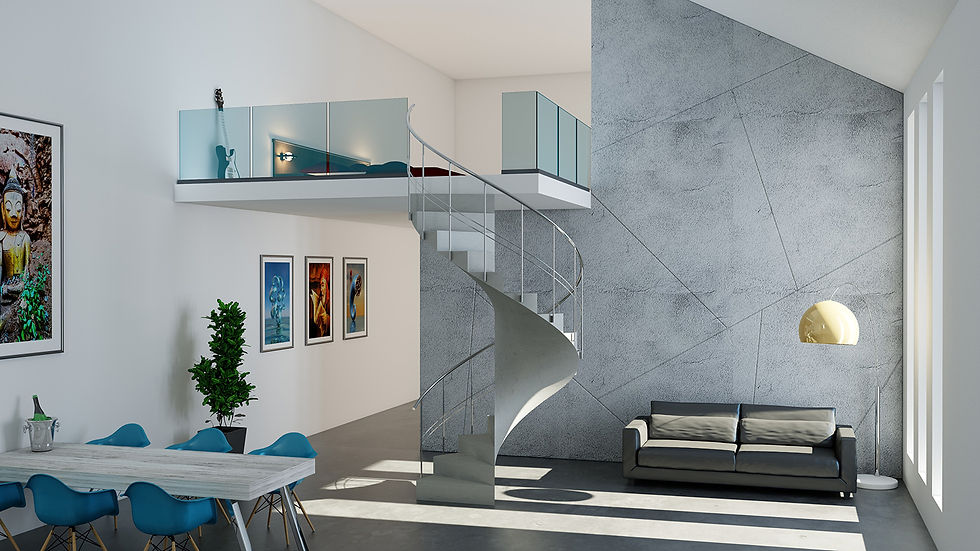
How to Choose the Right Interior Design CAD Software
Picking the right software can feel overwhelming. Here’s a quick checklist to help you decide:
Assess your needs: Are you focused on cabinetry, full interiors, or architectural details?
Consider your skill level: Some programs have steep learning curves.
Look for industry-specific features: Libraries, parametric tools, and production integration.
Check compatibility: Will it work with your existing hardware and other software?
Budget wisely: Factor in upfront costs and ongoing subscriptions.
Test drive: Use free trials to get a feel for the interface and features.
Remember, the right software will save you time and headaches, so invest in one that supports your business goals.
Boost Your Workflow with Integrated CAD Solutions
One of the biggest advantages of modern CAD tools is how they connect design to production. For woodworking and millwork, this means you can go from a 3D model straight to CNC cutting lists and machine code. No more manual data entry or guesswork.
PYTHA 3D CAD, for example, offers this seamless integration. You design your cabinets or furniture, then generate precise cutting instructions. This reduces errors, speeds up production, and helps you deliver projects faster.
Look for software that supports:
Parametric modeling: Easily update designs without starting over.
Material optimization: Minimize waste with smart nesting.
Collaboration tools: Share files with clients and workshop teams.
Cloud storage: Access your projects anywhere.
By streamlining your workflow, you can focus more on creativity and less on tedious tasks.
Ready to Elevate Your Interior Designs?
Choosing the right CAD software is a game-changer for woodworking, cabinetry, millwork, and interior design professionals. It empowers you to create stunning, precise designs and take your business to the next level.
If you want a tool that’s built for your industry and supports your entire workflow, check out interior design cad software. PYTHA USA is dedicated to helping North American professionals like you streamline design-to-production and grow your business.
Don’t settle for less. Invest in CAD tools for interiors that work as hard as you do. Your next masterpiece is just a few clicks away!


Comments